-1.png?width=151&height=28&name=Traact_Logo_Blue%20(1)-1.png)
Accessing the AI Assistant
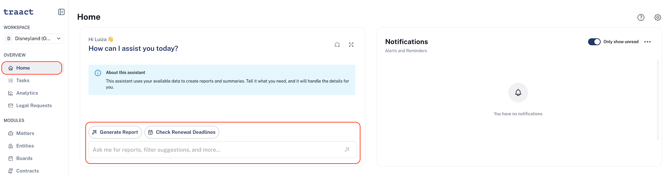
From your Homepage, you'll find the Traact AI Reporting Assistant panel on the left side of the screen.
To get started, you can either:
-
Select one of the suggested prompts, such as Generate Report or Check Renewal Deadlines, or
-
Type your own request into the chat box.
Getting the Best Results
For the most accurate responses, use clear and specific prompts. The more context you provide, the better the AI can understand your request and return the information you're looking for.
Examples:
-
Generate a report of all contracts expiring in the next 90 days.
-
Show me licenses that require renewal this quarter.
-
List all open matters assigned to the Legal team.
Selecting a Module
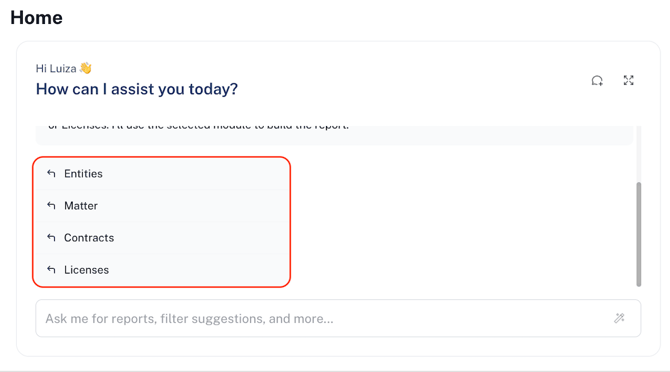
Because Traact includes multiple management modules—including Contracts, Licenses, Matters, Entity Management, Board Management, Tax, and more—the AI will first confirm which module your request relates to before generating a response.
Once the module is confirmed, the AI will gather the relevant information and generate the requested report or answer.
Your Chat History
Your conversation is automatically preserved while you work.
You can:
-
Close the AI panel and reopen it later.
-
Navigate to other Traact modules.
-
Continue your existing conversation without losing your chat history.
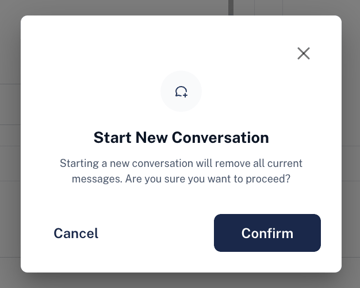
Your conversation will only be cleared if you select the New Chat button in the upper-right corner of the AI panel. Starting a new chat permanently ends the current conversation and begins a new one with no previous context.
Expanding the AI Panel
Next to the New Chat button, you'll find the Expand icon.
Selecting this option enlarges the AI panel, giving you more space to view longer conversations, reports, and responses.
If you have any questions or need assistance with a request, please contact your Customer Success Manager or reach out to the Traact Support team.