-1.png?width=151&height=28&name=Traact_Logo_Blue%20(1)-1.png)
How Entity-Based Visibility Works
Access in Traact flows hierarchically based on your organizational tree:
- Your Entity: Full visibility into records assigned to your designated home entity.
- Everything Below It: Automatic downstream visibility into subsidiary/child entities managed directly under your primary entity.
- Nothing Sideways or Up: Complete restriction from viewing parent entities or peer subsidiaries on parallel branches.
Scope Across Modules
Entity rules are enforced consistently across the entire platform. The same visibility boundary applies to:
- Users & Contacts
- Vendors
- Tasks & Contracts
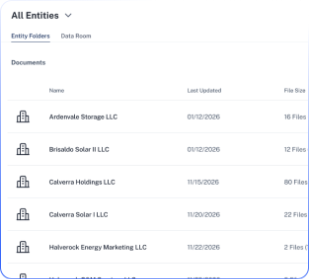
- Documents & Data Rooms
Roles & Permissions Summary
Traact offers four distinct user role levels to maintain security and delegate administration:
|
Role Level |
Access Scope |
Best Used For |
|
Admin |
Full access across the entire workspace. |
Global HQ admins, legal leadership, and systems administrators. |
|
Entity Admin |
Admin rights for specific assigned entities and child entities below them. |
Regional legal leads, subsidiary leads, or division managers. |
|
Member |
Module-level access governed strictly by entity permission scope. |
Standard team members and department staff. |
|
External |
Access restricted strictly to explicit matters or records assigned to them. |
Outside counsel, external auditors, or third-party advisors. |
Key Features & Guardrails
1. Mandatory Record Ownership
To eliminate records with no owner, Entity is a required field whenever creating a new record (user, contact, vendor, or document).
2. Confidentiality Rules
Sensitive matters (such as specific legal tasks) can be marked Confidential by default, restricting access even within the assigned entity.
3. Position History Tracking
Users and contacts are managed separately. Officer roles and internal positions maintain a complete historical log tied to each specific entity for audit readiness.
4. Localized Administration
Entity Admins can onboard new officers, promote team members, and update entity-specific board documents locally, removing dependencies and bottlenecks at HQ.
Step-by-Step: Onboarding a New Officer (Entity Admin Workflow)
1. Navigate to People & Contacts and click Add New.
2. Enter contact details (Name, Email, Phone, Address).
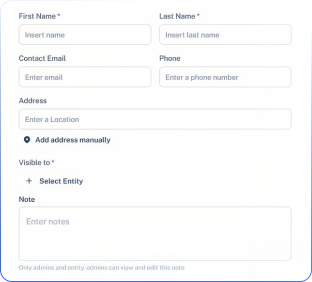
3. In the Visible To field, select the target Entity.
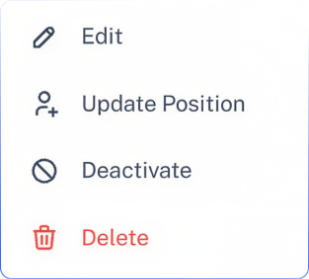
4. Under the contact’s Positions tab, assign their title, function, and effective start date.
Frequently Asked Questions (FAQ)
Q: Can a user belong to more than one entity?
A: Yes. Users can be assigned to higher-level entities to automatically view downstream entities, or granted specific multi-entity permissions as needed.
Q: What happens if an external user needs access to files across multiple subsidiaries?
A: External users are scoped strictly to the specific matters or entities they are invited to, preventing unauthorized access across broader corporate records.
Q: How do I request a change to our organization tree in Traact?
A: Global Admins can modify entity structures under Settings > Visibility and Permissions or contact support at ops@traact.com
Need Help?
If you have any questions or need assistance with a request, please contact your Customer Success Manager or reach out to the Traact Support team.